Appliance Aid takes part in the Amazon Associates programme. Some links on this page are affiliate links, and a qualifying purchase earns us a commission. Your price is unchanged.
🏆 RECOMMENDED PART
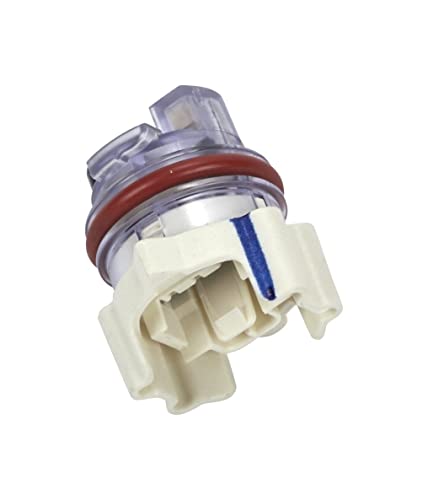
Whirlpool WPW10705575 Genuine OEM Dishwasher Turbidity Sensor Replacement Part - Replaces W10134016, W10134017, W10134058, and more
- GENUINE OEM: Whirlpool Genuine OEM (Original Equipment Manufacturer) Parts are designed specifically for your appliance, meet Whirlpool engineering standards, and are crafted to ensure the quality of your appliance
- REPLACEMENT PART NUMBERS: WPW10705575 Dishwasher Turbidity Sensor replaces the part numbers W10134016, W10134017, W10134058, W10055980, W10082647, W10253602, 8563432, 8574079, and W10705575
- COMPATIBLE APPLIANCES: WPW10705575 is compatible with multiple Whirlpool models, including WDF520PADM2 WDF520PADM3 WDF520PADW2 WDF520PADW3 WDF540PADB0 WDF540PADB1 WDF540PADM0 WDF540PADM1 WDF540PADT0 KDFE104DBL1 KDFE10...
- ONE YEAR WARRANTY: Whirlpool offers the well-tested, high quality parts that your appliances deserve with a one-year warranty
- KEEP YOUR HOME HUMMING: For over 100 years, Whirlpool has cared for your appliance as you care for your home, which is why our replacement parts are made using durable materials and innovative processes
What the WPW10705575 does
The turbidity sensor monitors the cleanliness of the wash water by detecting the amount of food particles and soil present. This data helps the dishwasher determine the appropriate wash cycle duration and water usage.
Symptoms when this part fails
- Dishes remain dirty after a wash cycle
- Dishwasher runs unusually long cycles
- Dishwasher stops mid-cycle
- Error codes related to water quality
- Dishwasher uses excessive water
Compatibility
Fits the Whirlpool family. Specifically:
- Any unit originally equipped with OEM part number(s): W10134016, W10134017, W10134058, W10055980, W10082647, W10253602, 8563432.
- Check the model/rating plate inside your appliance and compare it against the fitment table on the product listing before ordering — this guide does not list specific compatible models because Amazon does not provide verified fitment data through this pipeline.
Also replaces: W10134016, W10134017, W10134058, W10055980, W10082647, W10253602, 8563432
Tools you'll need
- Screwdriver (Phillips and/or flathead)
- Pliers
- Towels
- Small bucket
Difficulty: Moderate · Time: 30-60 minutes
How to install the WPW10705575, step by step
- Disconnect power to the dishwasher.
- Shut off the water supply to the dishwasher.
- Pull the dishwasher out from the cabinet.
- Locate and access the turbidity sensor, typically near the sump or drain.
- Disconnect wiring and water lines from the old sensor.
- Remove the old sensor and install the new one.
- Reconnect wiring and water lines.
- Slide the dishwasher back, restore power and water, then test.
Related troubleshooting
If swapping this part doesn't fix the issue, check these next: