
Samsung HAF-QIN-2P/EXP Genuine Refrigerator Water Filter, Reduces 99% of Harmful Contaminants for Clean, Clear Drinking Water,
- Samsung water filters reduce contaminants, giving your family fresh tasting water; Use with your Samsung.
- Samsung’s ultra-high-grade carbon block reduces 99% of potentially harmful contaminants
- Samsung refrigerator water filters offer long-lasting use and easy installation; It is recommended to.
- Only Samsung filters are guaranteed to perform correctly with your refrigerator, avoiding the risk of.

SAMSUNG Genuine Filter for Refrigerator Water and Ice, Carbon Block Filtration for Clean, Clear Drinking Water, 6-Month Life,
- Samsung water filters reduce contaminants, giving your family fresh tasting water
- Samsung’s ultra-high-grade carbon block reduces 99% of potentially harmful contaminants
- Use Authentication Tag to make sure your filter is a genuine Samsung filter; 1. Detach Authentication Tag.
- Samsung refrigerator water filters offer long-lasting use and easy installation; It is recommended to.

Pureline DA29-00020B Water Filter Replacement for Samsung® DA29-00020A/B, HAF-CIN/EXP, HAF-CIN, Kenmore 46-9101, 469101, 9101
- Innovative Filtration Technology: Our refrigerator water filters use a state of the art 3-step filtration.
- Quality You Can Trust: The PURELINE water filters stand out from the competition with a superior quality.
- Easy Installation and Cost-Efficient: Our water filters are not only high-performance but also affordable.
- Compatible Water Filter Replacement: DA-97-08006A-B, HAF-CIN/EXP. DA29-00020B, DA29-00020A, HAF-CIN.
Why Change Your Samsung Refrigerator Water Filter?
Cloudy ice or a slow water dispenser from your Samsung refrigerator indicates it is time to replace the water filter. Over time, these filters collect sediment, chlorine, and other impurities from your tap water. A clogged filter reduces water pressure, can impact the taste and smell of your water and ice, and may even put strain on your refrigerator's water system. Changing your filter regularly helps ensure clean, fresh-tasting water and ice for your family.
Most Samsung refrigerators have a filter indicator light that turns on or flashes when a replacement is needed. This usually happens every six months, or after dispensing about 300 gallons of water. Sticking to this schedule makes sure your water quality remains high and your appliance operates correctly.
Choosing the Right Samsung Water Filter
Before you begin, you need the correct replacement filter. Samsung refrigerators use various filter types, so check your owner's manual or the existing filter for the model number. Common filter locations include inside the refrigerator compartment or behind the grille at the bottom. The installation method also varies, usually either a twist-in or push-in style.
Genuine Samsung Filters
For optimal performance and to make sure compatibility, many homeowners prefer genuine Samsung filters. The Samsung HAF-QIN-2P/EXP Genuine Refrigerator Water Filter reduces 99% of potentially harmful contaminants, giving your family fresh tasting water. These filters offer long-lasting use and easy installation. Another excellent option is the SAMSUNG Genuine Filter for Refrigerator Water and Ice, which also uses ultra-high-grade carbon block filtration. This filter includes an authentication tag, letting you verify its authenticity by detaching the tag.
Compatible Aftermarket Filters
Several reputable brands offer compatible filters that meet or exceed Samsung's filtration standards. The Pureline DA29-00020B Water Filter Replacement is a popular choice for models requiring the DA29-00020A/B or HAF-CIN/EXP filter. Pureline filters use a state of the art 3-step filtration technology and are known for their quality and affordability. Always verify compatibility with your specific Samsung refrigerator model before purchasing any aftermarket filter.
Tools and Materials You Will Need
- New Samsung refrigerator water filter
- Small towel or shallow pan
- Non-abrasive cleaning cloth
The entire process usually takes about 10-15 minutes.
Safety First
Always turn off the water supply to your refrigerator before changing the filter. This prevents accidental leaks and ensures a dry work area. If you are unsure where your refrigerator's water shut-off valve is, it is typically located behind the appliance or under the kitchen sink. For general appliance maintenance tips, check out our Home Appliance Maintenance Checklist That Saves You $1000s.
How to Replace a Samsung Refrigerator Water Filter: step by step Guide
This guide covers the most common filter types found in Samsung refrigerators. While the exact location and removal method might vary slightly, the core steps remain similar whether you need to change the filter on a Samsung fridge with an internal filter or a bottom grille filter.
Step 1: Turn Off the Water Supply
Locate the water shut-off valve for your refrigerator. This valve is often behind the appliance or under the kitchen sink. Turn the valve clockwise until the water flow stops completely. This prevents water from spilling when you remove the old filter.
Step 2: Dispense Remaining Water or Ice
After turning off the water supply, open the refrigerator door and dispense about a cup of water from the dispenser. This releases any remaining pressure in the water line and helps prevent drips when you remove the filter. If your refrigerator has an ice maker, cycle it once to clear any water from the line. If your ice maker is not making ice, you might find solutions in our guide: Refrigerator ice maker not making ice? 7 fixes for Whirlpool, Samsung, LG, GE and more.
Step 3: Locate the Water Filter
The location of the water filter depends on your Samsung refrigerator model. Common locations include:
- Inside the refrigerator compartment: Often located in the upper right corner. These are typically twist-in filters.
- Behind the bottom grille: Situated at the bottom front of the refrigerator. These are usually push-in filters.
Consult your refrigerator's user manual if you cannot find the filter.
Step 4: Prepare for Spills
Even with the water supply turned off and the pressure relieved, a small amount of water may still drip from the filter housing when you remove the old filter. Place a small towel or a shallow pan underneath the filter area to catch any drips.
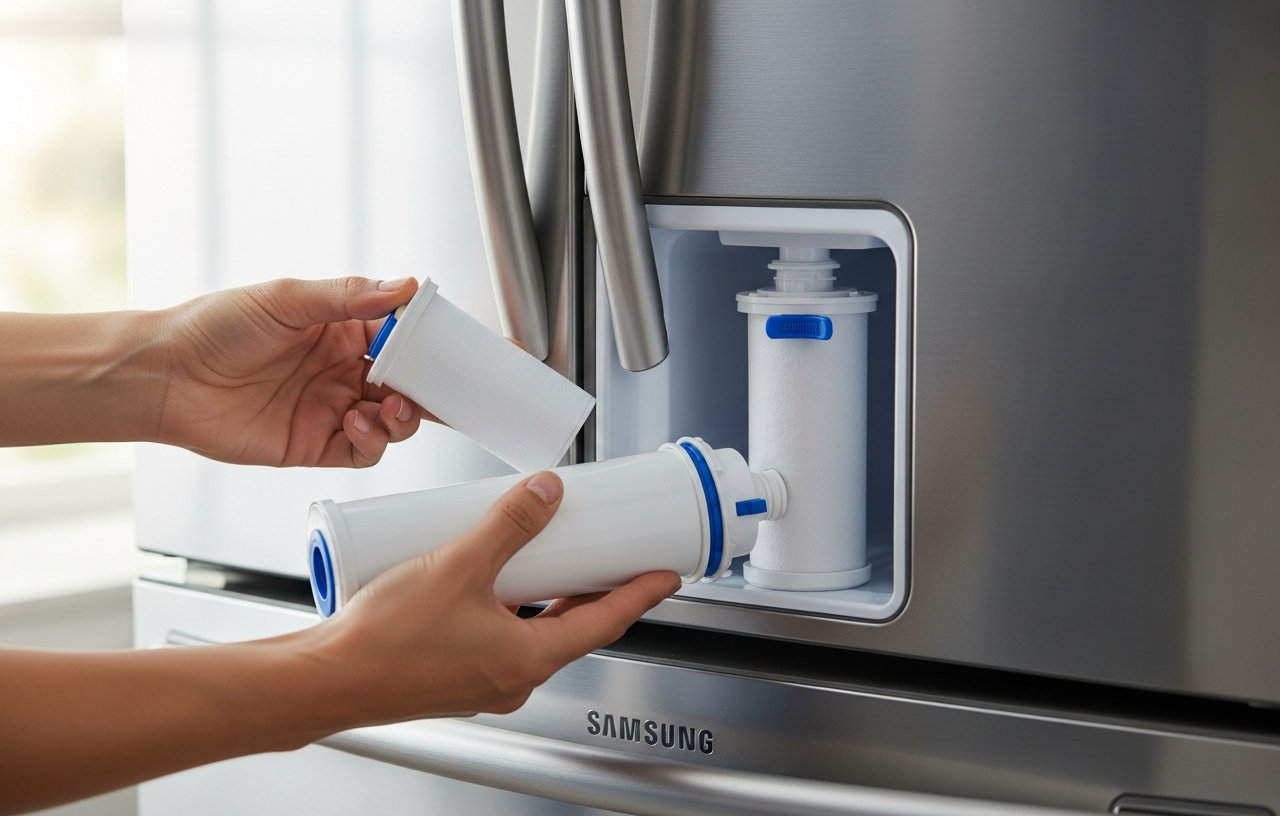
Step 5: Remove the Old Filter (Twist-in Type)
If your filter is inside the refrigerator compartment:
- Grasp the end of the filter that protrudes from the housing.
- Slowly twist the filter counter-clockwise about a quarter turn. You might feel a slight resistance as it disengages.
- Pull the filter straight out from the housing.
- Discard the old filter responsibly.
Step 6: Remove the Old Filter (Push-in Type)
If your filter is behind the bottom grille:
- Open the filter cover or press the push button to release the filter.
- Pull the filter straight out from the housing.
- Be ready for a small amount of water to escape.
- Discard the old filter properly.
Step 7: Install the New Filter (Twist-in Type)
For filters located inside the refrigerator:
- Remove the protective cap or packaging from the new filter.
- Align the new filter with the housing. Some filters have an arrow or alignment marks to help you.
- Push the filter firmly into the housing until it stops.
- Twist the filter clockwise about a quarter turn until it locks into place. You should feel it click securely.
Step 8: Install the New Filter (Push-in Type)
For filters located behind the bottom grille:
- Remove the protective cap or packaging from the new filter.
- Align the new filter with the housing.
- Push the filter firmly into the housing until it clicks into place.
- Close the filter cover, if applicable.
Step 9: Turn On the Water Supply
Slowly turn the water shut-off valve clockwise until it is fully open. Listen for the sound of water refilling the lines. Check the filter area for any immediate leaks.
Step 10: Flush the System
Dispense about 2-3 gallons of water from the refrigerator's water dispenser. This might take 5-10 minutes. The water may appear cloudy or milky at first, which is normal. Continue flushing until the water runs clear and steady. Discard the flushed water.
Step 11: Reset the Filter Indicator Light
After installing the new filter and flushing the system, you need to reset the filter indicator light on your Samsung refrigerator. The reset method varies by model, but common methods include:
- Press and hold the “Filter” or “Ice Type/Filter” button for 3-5 seconds.
- Press and hold the “Energy Saver” and “Lighting” buttons simultaneously for 3-5 seconds.
- Press and hold the “Alarm” and “Power Freeze” buttons simultaneously for 3-5 seconds.
Refer to your owner's manual for the exact instructions for your specific Samsung model. The light should turn off or change color, indicating the reset was successful.
Troubleshooting Common Issues
Most filter replacements go smoothly, but sometimes issues arise.
Slow Water Flow After Replacement
If water flow is still slow, make sure you flushed enough water through the system. Air trapped in the lines or carbon particles from the new filter can restrict flow. Dispense another gallon or two to clear it out. Also, double-check that the filter is installed correctly and fully seated. An improperly seated filter will not allow full water pressure.
Leaking Around the Filter
A leak usually means the filter is not seated properly. Turn off the water supply immediately and re-install the filter, making sure it is pushed or twisted all the way into its housing. Check the O-rings on the filter for any damage or misalignment. If the leak persists, the filter itself might be faulty, or the housing could be cracked. In such cases, contact Samsung customer support or a qualified appliance technician.
Filter Indicator Light Won't Reset
If the indicator light does not reset, try holding the reset button for a longer duration, up to 10 seconds. If that fails, consult your refrigerator’s manual for alternative reset procedures. Some models have specific button combinations. If all else fails, a power cycle (unplugging the refrigerator for 5 minutes and plugging it back in) can sometimes resolve control panel glitches. For other troubleshooting tips when your refrigerator is not cooling, read our guide: Refrigerator Not Cooling But Light Is On? DIY Troubleshooting Guide.
When to Call a Professional
While replacing a Samsung refrigerator water filter is a simple DIY task, persistent issues might require professional help. If you experience continuous leaks, severe water flow problems that do not improve after troubleshooting, or error codes that point to a larger water system issue, it is time to call an appliance repair technician.
A service call from an appliance repair technician typically costs between $80-$150, not including parts or labor for the actual repair. Diagnosing a complex water system issue might add to these costs. Most technicians charge an hourly rate of $50-$100 once on site. Getting a professional diagnosis can prevent further damage to your appliance and ensure proper operation.
Conclusion
Knowing how to replace a Samsung refrigerator water filter is a valuable skill for any homeowner. Regular filter changes ensure your family always has access to clean, great-tasting water and ice. It also extends the lifespan of your refrigerator’s water dispensing system.
Samsung HAF-QIN-2P/EXP Genuine Refrigerator Water Filter, Reduces 99% of Harmful Contaminants for Clean, Clear Drinking Water,
- Samsung water filters reduce contaminants, giving your family fresh tasting water; Use with your Samsung.
- Samsung’s ultra-high-grade carbon block reduces 99% of potentially harmful contaminants
- Samsung refrigerator water filters offer long-lasting use and easy installation; It is recommended to.
- Only Samsung filters are guaranteed to perform correctly with your refrigerator, avoiding the risk of.
SAMSUNG Genuine Filter for Refrigerator Water and Ice, Carbon Block Filtration for Clean, Clear Drinking Water, 6-Month Life,
- Samsung water filters reduce contaminants, giving your family fresh tasting water
- Samsung’s ultra-high-grade carbon block reduces 99% of potentially harmful contaminants
- Use Authentication Tag to make sure your filter is a genuine Samsung filter; 1. Detach Authentication Tag.
- Samsung refrigerator water filters offer long-lasting use and easy installation; It is recommended to.
Pureline DA29-00020B Water Filter Replacement for Samsung® DA29-00020A/B, HAF-CIN/EXP, HAF-CIN, Kenmore 46-9101, 469101, 9101
- Innovative Filtration Technology: Our refrigerator water filters use a state of the art 3-step filtration.
- Quality You Can Trust: The PURELINE water filters stand out from the competition with a superior quality.
- Easy Installation and Cost-Efficient: Our water filters are not only high-performance but also affordable.
- Compatible Water Filter Replacement: DA-97-08006A-B, HAF-CIN/EXP. DA29-00020B, DA29-00020A, HAF-CIN.